
HIPAA compliant app development is not a feature you add before launch. It is a set of decisions about where patient data lives, who can see it, and what happens when something goes wrong, and those decisions shape your architecture from the first sprint.
This guide explains HIPAA compliant app development in plain language what HIPAA actually requires from software, when your app falls under it, and the exact safeguards we build into every US healthcare project at Briskcovey. If you’re planning a new product, our healthcare app development team works through this same process with every client.
Key Takeaways
- There is no official HIPAA certification for apps. Compliance means meeting the HIPAA rules and being able to prove it with documentation.
- Not every health app is covered by HIPAA. It applies when your app creates, stores or shares PHI for a covered entity or as its business associate.
- Sign BAAs with every vendor that touches PHI, including your cloud host, email or SMS provider, and AI provider.
- The Security Rule drives the build, access control, audit logs, encryption, secure authentication and a documented risk analysis.
- Plan realistic timelines. HIPAA compliant app development adds roughly 3-6 weeks of extra work for a typical MVP, mostly for security controls, testing and documentation.
What HIPAA Compliant App Development Means
The Health Insurance Portability and Accountability Act (HIPAA) protects protected health information (PHI) in the United States. HIPAA compliant app development means designing, building and running your app so that PHI stays private, secure and available, in line with the rules published by the US Department of Health and Human Services (HHS).
Three terms matter most:
| Term | What it means | Example |
| PHI | Health information linked to a person, such as names, dates, contact details or record numbers combined with health data | A patient’s appointment history with their phone number |
| Covered entity | Health plans, clearinghouses and healthcare providers that bill electronically | A clinic, hospital or insurer |
| Business associate | A vendor that handles PHI on behalf of a covered entity | Your app company, cloud host or SMS provider |
If you build software that handles PHI for a clinic or hospital, your company is usually a business associate. That means you are directly responsible for protecting the data, not just your client.
Does Your App Need to Be HIPAA Compliant?
This is the first question in any HIPAA compliant app development project, and the answer depends on who you work for and what data you handle.
| Your app | HIPAA usually applies? | Why |
| Clinic management or EHR software used by providers | Yes | Handles PHI for covered entities |
| Telehealth app connecting patients with US doctors | Yes | Doctors are covered entities, the app is a business associate |
| Patient portal or remote monitoring app run for a hospital | Yes | Built and operated on behalf of a covered entity |
| Consumer fitness or diet tracker people use on their own | Usually no | No covered entity involved |
| Wellness app that shares data with a user’s doctor at the user’s request | It depends | Get advice, the data flow decides |
Even when HIPAA doesn’t apply, health apps aren’t free of rules. Many consumer health apps fall under the FTC’s Health Breach Notification Rule, and state privacy laws are adding more protections for health data. Building to HIPAA level security is a safe default for any app that stores health information.
The Three HIPAA Rules Every Developer Must Know
| Rule | What it covers | What it means for your app |
| Privacy Rule | Who may use and share PHI, and patients’ rights to access their records | Role-based access, patient record access and export, sharing only the minimum necessary data |
| Security Rule | Administrative, physical and technical safeguards for electronic PHI | Risk analysis, access control, audit logs, encryption, secure authentication, backups |
| Breach Notification Rule | What to do when unsecured PHI is exposed | Detection, investigation and notice to affected individuals without unreasonable delay and within 60 days, larger breaches also go to HHS and the media |
For HIPAA compliant app development, the Security Rule does most of the work. Some of its safeguards are required and others addressable, which means you must implement them or document why an equivalent measure is reasonable. In practice, treat encryption and multi-factor authentication as required, HHS has proposed Security Rule updates that would make many of these safeguards explicitly mandatory, so check their current status before you plan your controls.
Step 1: Map Every PHI Data Flow
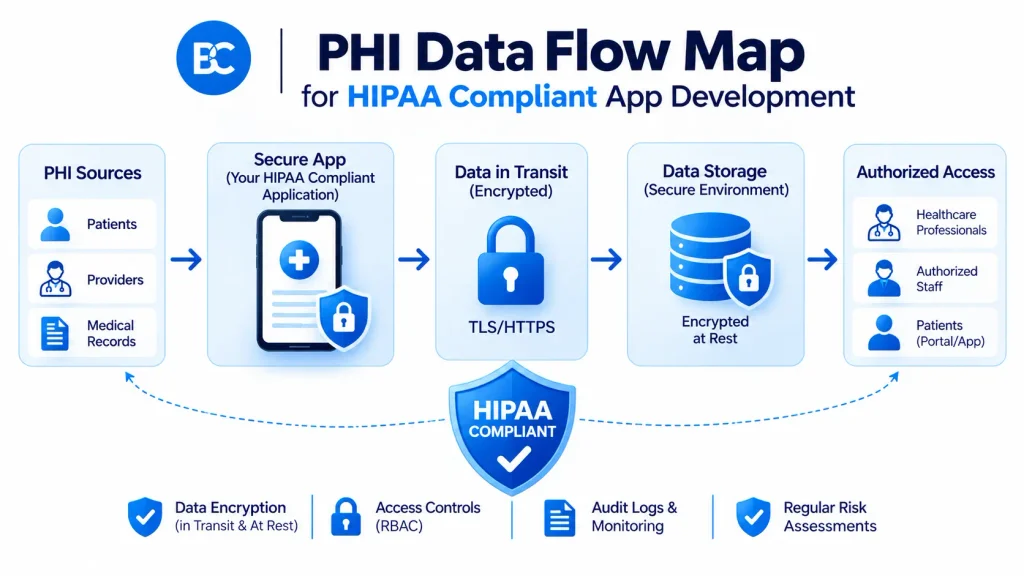
You can’t protect data you haven’t mapped. Before any code, draw where PHI enters, moves and rests:
- Where it enters: sign-up forms, intake questionnaires, uploads, device data, integrations with EHRs or labs.
- Where it travels: your API, third-party services, email and SMS, push notifications, analytics, AI services.
- Where it rests: databases, file storage, backups, logs, caches, and devices.
- Who can see it: patients, doctors, nurses, front-desk staff, admins, support staff, your developers.
Then apply the minimum necessary principle, if a screen, report or service doesn’t need PHI, design it without PHI. Every piece of PHI you don’t collect is one you never have to protect.
Step 2: Choose HIPAA Eligible Infrastructure and Sign BAAs
A business associate agreement (BAA) is a contract in which a vendor promises to protect PHI under HIPAA. HIPAA compliant app development requires a BAA with every vendor that creates, receives, stores or sends PHI for you.
| Vendor type | Examples | What to check |
| Cloud hosting | AWS, Microsoft Azure, Google Cloud | Sign the provider’s BAA and use only its HIPAA eligible services |
| Database and storage | Managed PostgreSQL, object storage | Encryption at rest, backups, access logs |
| Email, SMS and calls | Transactional email and messaging providers | BAA available, avoid PHI in message content where possible |
| Video consultations | Telehealth video SDKs | BAA, end-to-end or strong transport encryption |
| Analytics and error tracking | Product analytics, crash reporting | Never send PHI, strip identifiers or choose a HIPAA-ready tool |
| AI and LLM providers | AI APIs used for notes, intake or chat | BAA and zero or limited data retention |
A common surprise, many popular analytics, chat-widget and marketing tools won’t sign a BAA. They must stay away from any screen or event that contains PHI.
Step 3: Build the HIPAA Technical Safeguards
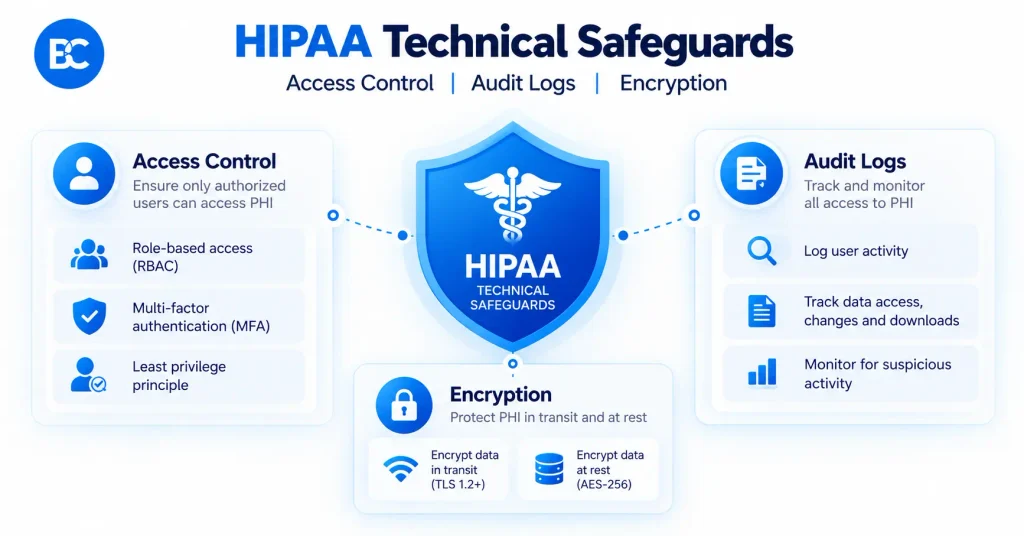
These are the safeguards that live in your code and infrastructure. NIST’s SP 800-66 Rev. 2 is the best free guide to implementing them.
| Safeguard | What HIPAA expects | How we build it |
| Access control | Unique user IDs, emergency access, automatic logoff, encryption | Role-based access per user type, session timeouts, break-glass access with logging |
| Audit controls | Record activity in systems that hold PHI | Immutable logs of who viewed, created, changed or exported each record |
| Integrity | Protect PHI from improper changes or deletion | Database constraints, versioned records, checksums on files, soft deletes |
| Authentication | Verify that users are who they claim to be | MFA for staff, strong password rules, secure session tokens, SSO for clinics |
| Transmission security | Protect PHI moving over networks | TLS 1.2+ everywhere, certificate pinning in mobile apps, no PHI in URLs |
| Encryption at rest | Addressable, but treat as required | AES-256 for databases, files and backups, with managed keys |
Two extra rules we follow in every HIPAA compliant app development project, never put PHI in logs or error reports, and keep PHI out of non-production environments by using synthetic or de-identified test data.
Step 4: Put Administrative and Physical Safeguards in Place
HIPAA isn’t only code. A large part of compliance is how your team works.
- Risk analysis: a documented review of threats to PHI and how you reduce them, repeated at least yearly and after major changes.
- Security officer: one named person responsible for HIPAA security.
- Workforce access and training: least privilege access for developers and support staff, HIPAA training at onboarding and every year.
- Policies and procedures: written policies for access, incident response, backups and device use. HIPAA documentation must be kept for 6 years.
- Contingency plan: tested backups, disaster recovery and an emergency mode for critical functions.
- Physical safeguards: your cloud provider covers its data centers, you still need laptop encryption, screen locks and secure device disposal for your own team.
Step 5: Secure the HIPAA Compliant Mobile App
Phones get lost, shared and screenshotted, so a HIPAA compliant mobile app needs extra care on the device itself:
- No PHI in push notifications. Say “You have a new message from your clinic”, not the test result.
- Encrypted local storage. Store tokens in the iOS Keychain or Android Keystore, and keep cached PHI encrypted or avoid caching it at all.
- Biometric or PIN lock for re-opening the app, with automatic logout after inactivity.
- Hide sensitive screens in the app switcher, and block screenshots on screens showing PHI where the platform allows it.
- Remote session revocation, so a lost phone can be signed out from the server.
- No PHI in app analytics, crash reports or deep links.
Step 6: Use AI With PHI Safely
AI is transforming healthcare apps, from patient intake to clinical notes, but it adds new paths for PHI to leave your system. Safe HIPAA compliant app development with AI follows five rules:
- Use only AI providers that sign a BAA, with zero or limited data retention.
- Send the minimum PHI the task needs, and de-identify data wherever the task allows.
- Log every prompt and response that involves PHI, with the same access controls as the medical record.
- Keep a clinician in the loop, AI drafts, a human reviews before anything enters the record.
- Include AI in your risk analysis, and re-test outputs after every model update.
We apply the same guardrails in our AI automation services. As an Anthropic Claude Partner, we design AI features for healthcare where careful, accurate language matters more than speed.
Step 7: Test, Document and Prove Compliance
In HIPAA compliant app development, we did it isn’t enough, you must be able to show it. Before launch:
- Complete and document a risk analysis for the app and its infrastructure.
- Run a third-party penetration test and fix every high and critical finding.
- Test access rules for every role, a receptionist should never see clinical notes they don’t need.
- Verify audit logs capture views, edits and exports, and that logs can’t be altered.
- Rehearse a breach response: who investigates, who decides, who notifies, and within what time.
- Keep a compliance folder: BAAs, policies, risk analysis, training records and test reports, kept for at least 6 years.
Many clients also choose an independent assessment such as SOC 2 or HITRUST to show buyers their controls work. These aren’t required by HIPAA, but large hospitals often ask for them.
Common HIPAA Mistakes in App Development
- Sending PHI to analytics, chat or marketing tools that won’t sign a BAA
- Writing PHI into logs, error messages or crash reports
- Copying production data into development or test environments
- Showing PHI in push notifications, emails or SMS previews
- Giving every developer full production database access
- Treating HIPAA as a one-time launch task instead of an ongoing process
- Calling the app HIPAA certified, even though no official HIPAA certification exists
HIPAA Compliant App Development Checklist
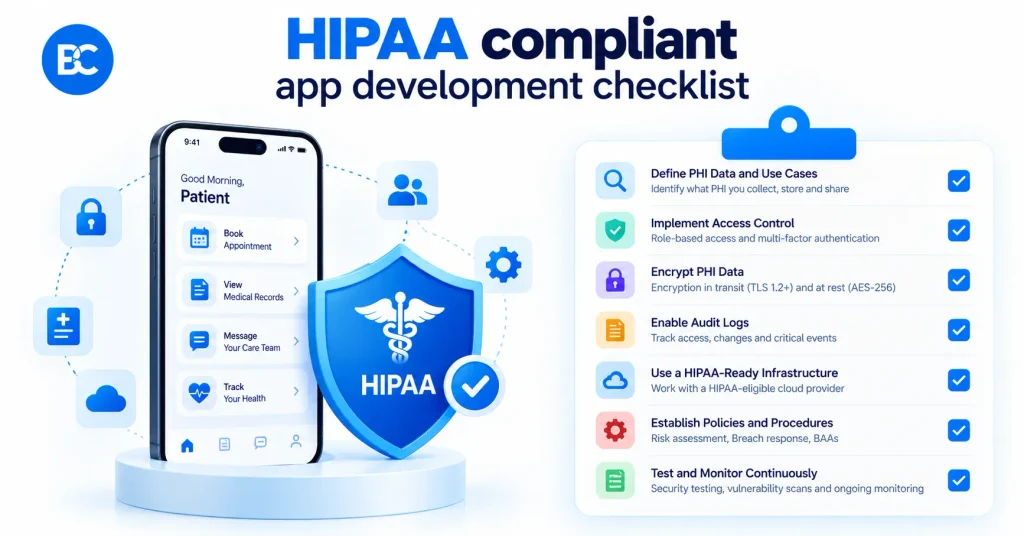
Use this checklist before any HIPAA compliant app development project goes live.
Planning
- Confirmed whether HIPAA applies and documented why
- Mapped every place PHI enters, travels and rests
- Applied the minimum necessary principle to every screen and service
Vendors and infrastructure
- BAAs signed with the cloud host and every vendor that touches PHI
- Only HIPAA eligible cloud services used for PHI
- No PHI sent to analytics, marketing or chat tools without a BAA
Technical safeguards
- Role-based access, unique user IDs and automatic logoff
- MFA for staff and admin accounts
- Encryption in transit (TLS 1.2+) and at rest (AES-256)
- Immutable audit logs for views, edits and exports
- No PHI in logs, URLs, notifications or test environments
Mobile app
- Secure local storage, app lock and remote session revocation
- Sensitive screens hidden in the app switcher
People and process
- Documented risk analysis and named security officer
- Team trained on HIPAA, access reviewed regularly
- Breach response plan written and rehearsed
- Policies, BAAs and test reports kept for at least 6 years
This is general guidance, not legal advice. Confirm your HIPAA obligations with a qualified healthcare compliance advisor.
Frequently Asked Questions
It is the process of designing, building and running an app so that protected health information (PHI) is handled according to the HIPAA Privacy, Security and Breach Notification Rules, with safeguards and documentation to prove it.
No. HHS does not certify apps or vendors. Some companies use independent assessments such as SOC 2 or HITRUST to show their controls, but HIPAA compliance itself is shown through safeguards, policies and documentation.
It does if your app creates, receives, stores or sends PHI for a covered entity, such as a clinic, hospital or health plan, or as their business associate. Consumer wellness apps used without a provider usually aren’t covered, but other laws like the FTC Health Breach Notification Rule may apply.
A BAA is a contract in which a vendor agrees to protect PHI under HIPAA. You need one with your client and with every vendor that touches PHI, including your cloud host, messaging providers and AI provider.
All three will sign a BAA and offer HIPAA eligible services. Your app is only compliant if you use those eligible services and configure them securely; the cloud provider doesn’t make your app compliant on its own.
Access control, audit controls, integrity controls, person or entity authentication, and transmission security. In practice this means role-based access, audit logs, encryption, MFA and secure connections.
Keep PHI out of push notifications, encrypt local storage, add app lock and auto-logout, hide sensitive screens, support remote sign-out, and never send PHI to analytics or crash reporting tools.
Yes, if the AI provider signs a BAA, you send only the minimum PHI needed, log every interaction, keep a clinician reviewing AI output, and include AI in your risk analysis.
Compliance typically adds 3-6 weeks to a healthcare MVP for security controls, testing and documentation. Building it in from the start is much faster than retrofitting it later.
Briskcovey is an AI first software studio and Anthropic Claude Partner that builds and runs its own clinic management SaaS, RazorClinic. We bring hands on experience with secure multi-tenant healthcare platforms, healthcare integrations and safe AI in clinical workflows.
Build Your HIPAA Compliant App With Briskcovey
Briskcovey is an AI-first software studio in Jaipur, India, and an Anthropic Claude Partner. We offer end-to-end HIPAA compliant app development for clinics, healthtech startups and health networks, secure architecture, BAA-ready infrastructure, safe AI features and the documentation to prove it. For the bigger picture, read our HealthTech App Development in 2026 playbook.
Whether you’re starting a new patient app, adding AI to an existing platform, or preparing for a hospital’s security review, we start the same way, map the PHI, then build the safeguards around it.
Book a free 30-minute travel app discovery call