
AI agent development has moved from demos to real business work. In 2026, companies use AI agents to answer customers, qualify leads, process documents and update their systems, often around the clock. Yet many agent projects still stall after the pilot, because they start with the technology instead of the workflow.
This guide explains AI agent development in plain language, what an AI agent is, where it pays off, how to build one safely, and how we approach agent projects in our AI agent development services at Briskcovey.
Key Takeaways
- An AI agent decides and acts, not just answers. It uses tools, data and multiple steps to complete a goal, unlike a basic chatbot.
- Start with one workflow. The best AI agent development projects automate one painful, repetitive process first, then expand.
- Simple beats complex. A single well-designed agent with good tools usually outperforms a complicated multi-agent system.
- Guardrails are part of the build. Least-privilege access, human approval for risky actions and protection against prompt injection come before launch, not after.
- Plan realistic timelines. A focused AI agent typically takes 4-8 weeks to build and test, agents connected to several business systems take 2-4 months.
What Is an AI Agent?
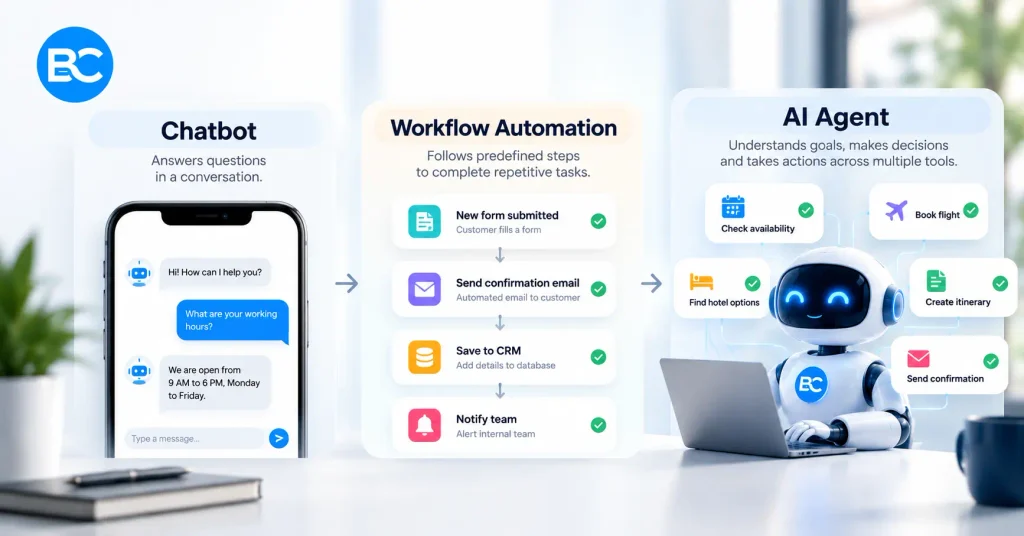
An AI agent is software that uses a large language model (LLM) to understand a goal, decide the next step, use tools such as your CRM, calendar or database, and keep going until the task is done or a human needs to step in.
| Chatbot | Workflow automation | AI agent | |
| What it does | Answers questions | Runs fixed, pre-defined steps | Plans and takes steps toward a goal |
| Handles new situations | Poorly | No, rules only | Yes, within its tools and limits |
| Uses business systems | Rarely | Yes, fixed integrations | Yes, chooses which tool to use |
| Best for | FAQs and simple support | Predictable, repetitive tasks | Varied tasks that need judgment |
Good AI agent development often combines both worlds, fixed workflow steps where the process is predictable, and agent reasoning only where judgment is genuinely needed. Anthropic’s guide to building effective agents makes the same point, start with the simplest solution that works.
AI Agent Use Cases by Department
| Department | AI agent use cases | Typical result |
| Sales | Lead research, lead qualification, personalized follow-ups, CRM updates | Faster response to every lead |
| Customer support | Answering tickets from your knowledge base, order lookups, refunds within limits, escalation | Shorter wait times, fewer repetitive tickets |
| Operations | Document processing, data entry, invoice matching, scheduling | Hours of manual work removed each week |
| HR | Candidate screening, interview scheduling, employee policy questions | Faster hiring steps |
| Finance | Invoice extraction, expense checks, report drafts | Fewer errors and quicker closing |
| Marketing | Content research, campaign reports, social media drafts | More output from the same team |
Step 1: Pick One Workflow Worth Automating
Successful AI agent development starts with one workflow, not a vision for the whole company. A good first workflow passes five tests:
- It repeats often: daily or weekly, not once a quarter.
- It costs real time: hours of staff work each week.
- It needs some judgment: too varied for fixed rules, but not so risky that every step needs an expert.
- The data and tools are reachable: through APIs, a database or documents the agent can access.
- Success is measurable: response time, tickets closed, leads qualified, documents processed.
Write the workflow down step by step, as a person does it today. That document becomes the agent’s job description and your test plan.
Step 2: Choose Your AI Agent Development Approach
There is no single right way to build AI agents. Choose based on how complex the workflow is and how much control you need.
| Approach | Examples | Best for | Trade-offs |
| No-code and low-code workflows | n8n, Make, Zapier with AI steps | Simple, internal automations, quick pilots | Limited control, harder to test and secure at scale |
| Agent frameworks | LangChain, LangGraph and similar | Multi-step agents with memory and many tools | More engineering, framework learning curve |
| Direct LLM APIs with custom tools | Claude API and other model APIs | Production agents that need full control, security and reliability | Requires an experienced engineering team |
A practical path is to pilot the workflow quickly with a low-code tool, then move proven agents to custom code on a model API when they need to scale, integrate deeply, or handle sensitive data.
Step 3: Connect Your Data and Tools (RAG, MCP and APIs)
An AI agent is only as useful as the data and tools it can reach. Three building blocks do most of the work in AI agent development:
- RAG (retrieval-augmented generation): the agent searches your documents, policies or knowledge base and answers from them, instead of guessing. Best for support agents and internal assistants.
- APIs and function calling: the agent calls your CRM, booking system, ERP or calendar to look up or update records.
- MCP (Model Context Protocol): an open standard for connecting AI models to tools and data sources in a consistent way. With the Model Context Protocol, one connector can serve many agents and AI apps.
Give the agent the fewest tools it needs, with clear names and descriptions. Most agent errors come from vague tools and messy data, not from the model.
Step 4: Design the AI Agent Architecture
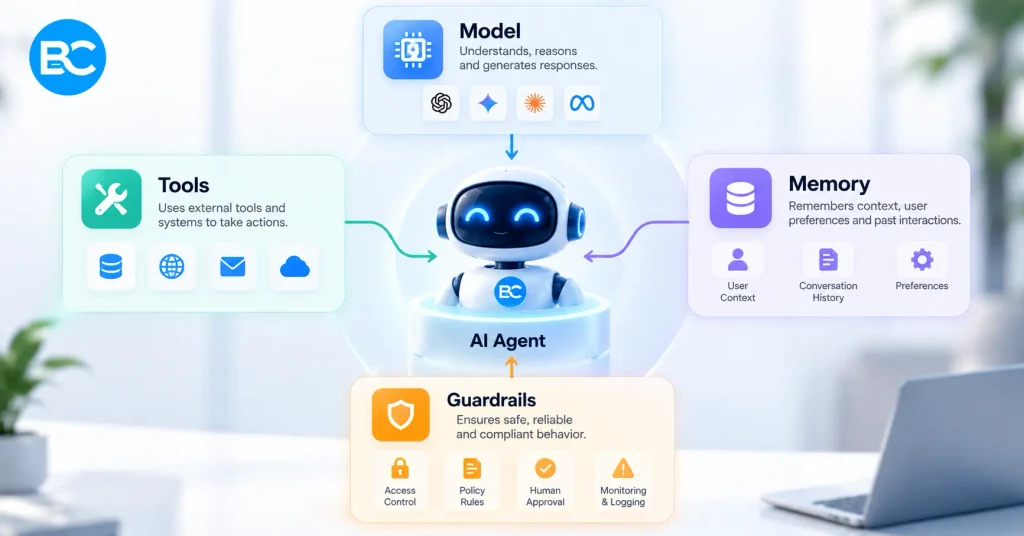
Every production AI agent needs the same core parts:
| Component | What it does | Design tip |
| Model | Understands requests and decides the next step | Choose the Right AI Model for Each Task by Using Advanced Models for Complex Reasoning and Faster Models for Simple Tasks |
| Instructions | Defines the agent’s role, rules and tone | Write them like a job description, with examples |
| Tools | Actions the agent can take | Few, well-named tools with strict input validation |
| Knowledge (RAG) | Company data the agent can search | Clean, current documents with access controls |
| Memory | Context from the conversation or past cases | Store only what’s needed; respect privacy rules |
| Orchestration | Controls the loop of thinking, acting and checking | Set step limits and timeouts |
| Guardrails | Blocks unsafe actions and outputs | Approval steps for payments, deletions and external messages |
| Observability | Logs every step, tool call and cost | Essential for debugging, audits and improvement |
Start with a single agent. Add multiple agents only when one agent’s instructions or tools become too large to manage reliably.
Step 5: Build Security and Guardrails In
An AI agent can take real actions, so security is a core part of AI agent development, not a final check. The OWASP Top 10 for LLM Applications is a good starting list of risks. The ones we design for in every project:
| Risk | What can go wrong | How to prevent it |
| Prompt injection | Hidden instructions in an email, web page or document trick the agent | Treat all outside content as data, never as instructions; restrict what tools can do |
| Excessive permissions | The agent can delete, pay or send more than it should | Least-privilege access and separate credentials per agent |
| Risky actions without review | Wrong refunds, emails or updates go out automatically | Human approval for payments, deletions and external messages |
| Data leakage | Personal or confidential data reaches the wrong person or model | Access controls on RAG data, data minimization, vendor data agreements |
| Hallucinated facts | The agent states prices, policies or results that aren’t true | Answer from verified data only, and say “I don’t know” when data is missing |
| Runaway loops and costs | The agent keeps calling tools or models | Step limits, timeouts, budgets and alerts |
For regulated industries, the bar is higher. A healthcare agent that touches patient data needs a BAA with the AI provider and HIPAA safeguards, see our guide to HIPAA compliant app development.
Step 6: Test and Evaluate Before Launch
AI agents don’t fail like normal software. The same input can produce different outputs, so AI agent development needs its own testing approach:
- Build a test set of 50-200 real examples from the workflow, including tricky and edge cases, with the correct outcome for each.
- Measure what matters: task success rate, correct tool use, accuracy of answers, escalation rate, time per task and cost per task.
- Test attacks on purpose: prompt injection attempts, requests outside the agent’s role, and attempts to extract data.
- Shadow mode first: run the agent alongside your team, compare its decisions with theirs, then hand over step by step.
- Re-test after every change to instructions, tools or model versions.
Step 7: Follow an AI Agent Development Process That Ships
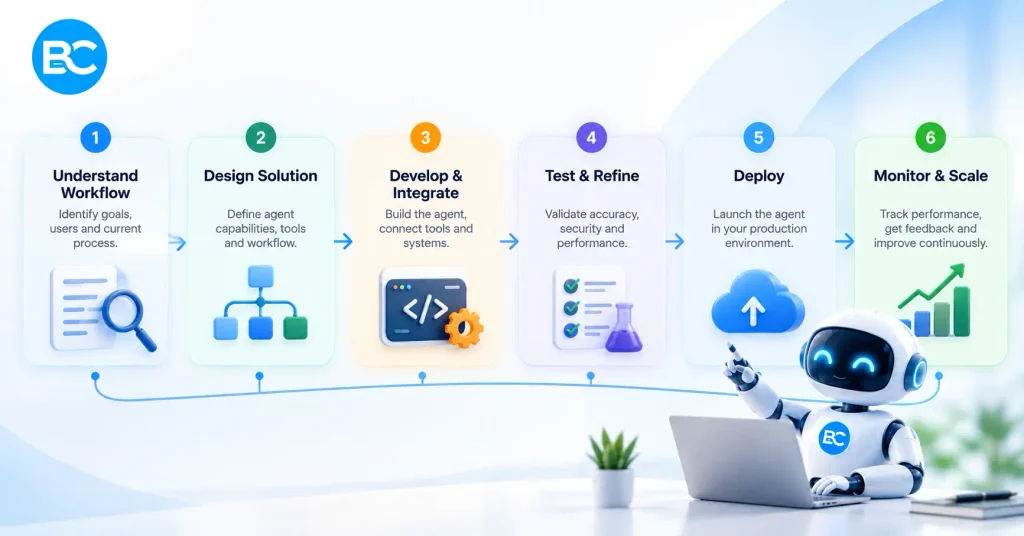
- Discovery (1-2 weeks). Pick the workflow, document it step by step, confirm data and tool access, and agree on success metrics.
- Prototype (1-2 weeks). Build a working version on real examples and show it to the people who do the work today.
- Build and integrate (2-6 weeks). Production tools, integrations, guardrails, logging and an admin view.
- Test and evaluate (1-2 weeks). Run the test set, security tests and shadow mode.
- Launch and monitor. Go live with human review for risky actions, watch metrics daily at first, and improve weekly.
In AI agent development, a focused agent typically takes 4-8 weeks from discovery to launch. Agents connected to several business systems, or used in regulated industries, take 2-4 months.
AI Agents by Industry
The same AI agent development principles apply everywhere, but each industry has its own best first use cases.
Healthcare. AI patient intake agents collect symptoms and history before a visit, documentation agents draft clinical notes for doctors to review, and scheduling agents reduce no-shows. Every healthcare agent needs HIPAA level safeguards and a clinician in the loop. Read more in our HealthTech App Development in 2026 playbook.
Real estate. Lead qualification agents reply to property enquiries within seconds, ask the right questions on WhatsApp, and book viewings into the agent’s calendar. This is the kind of AI lead automation we build for brokers through our real estate app development work.
Travel. Trip-planning agents turn a traveler’s request into a bookable itinerary, and support agents handle changes and disruptions. Every price and seat must be checked live with suppliers. See our guide to travel app development.
Professional services and SaaS. Support agents answer from documentation, sales agents research leads and draft outreach, and operations agents process forms, invoices and contracts.
Common AI Agent Development Mistakes
- Starting with a company-wide “AI strategy” instead of one measurable workflow
- Building a complex multi-agent system when one agent with good tools would do
- Giving the agent broad access to every system “just in case”
- Letting the agent send emails, payments or deletions without human approval
- Feeding it messy, outdated documents and expecting accurate answers
- Skipping a test set, so nobody knows whether changes made the agent better or worse
- Launching without logs, cost tracking or a way to hand over to a human
AI Agent Development Checklist
- One workflow chosen, documented step by step, with clear success metrics
- Build approach chosen (low-code, framework or direct API) for this stage
- Data cleaned and access-controlled; RAG sources current
- Tools limited to what the agent needs, with input validation
- Least-privilege credentials, separate for each agent
- Human approval for payments, deletions and external messages
- Prompt injection and data-leak tests passed
- Test set built and success rate measured
- Step limits, timeouts and cost alerts set
- Every step, tool call and decision logged
- Clear hand-over path to a human
- Vendor data agreements in place (and a BAA for healthcare data)
Frequently Asked Questions
AI agent development is the process of designing, building, testing and running software that uses a large language model to plan and complete tasks, using tools and business data, with guardrails and human oversight where needed.
A chatbot mainly answers questions. An AI agent can decide what to do next, use tools such as a CRM or calendar, and complete multi-step tasks toward a goal.
A focused AI agent usually takes 4-8 weeks from discovery to launch. Agents connected to several business systems or used in regulated industries take 2-4 months.
Lead qualification, customer support from a knowledge base, document processing, scheduling, data entry, and research tasks are the most common and reliable starting points.
No. Frameworks help with complex, multi-step agents, but many production agents are built directly on a model API with custom tools. Low-code tools like n8n are good for quick pilots.
MCP (Model Context Protocol) is an open standard for connecting AI models to tools and data sources in a consistent way, so one connector can be reused by many agents and AI apps.
AI agents can be safe when the right safeguards are in place, including limited access permissions, human approval for high-risk actions, prompt injection protection, data security controls, thorough testing, and detailed activity logs.
Yes, if the AI provider signs the right data agreements (such as a BAA for US healthcare data), data is minimized, access is controlled and every interaction is logged.
By task success rate, accuracy, escalation rate, time saved per task, cost per task and user satisfaction, measured against a test set and in live use.
Briskcovey is an AI-first software studio and Anthropic Claude Partner. We build AI agents for healthcare, real estate, travel and business operations, with security, testing and guardrails built in from day one.
Build Your AI Agent With Briskcovey
Briskcovey is an AI-first software studio in Jaipur, India, and an Anthropic Claude Partner. We offer end-to-end AI agent development, workflow discovery, RAG and MCP integrations, secure tool access, testing and monitoring, for clients in the US, UK, UAE and Australia.
Whether you need one agent to qualify leads, answer support tickets or process documents, or a set of agents connected across your business systems, we start the same way: one workflow, mapped properly and measured from day one.
Book a free 30-minute ai agent discovery call