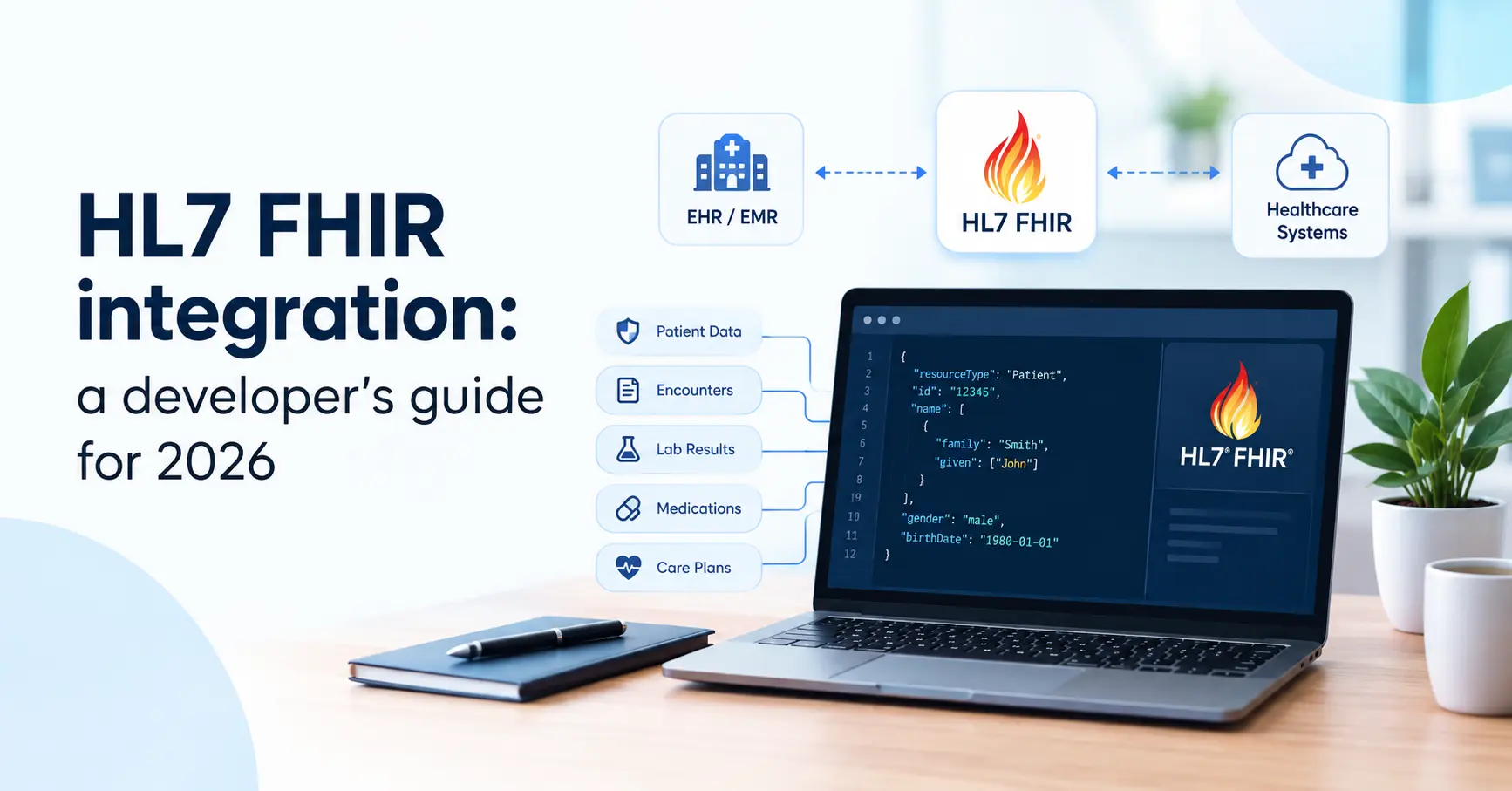
FHIR integration is now the standard way for healthcare apps to exchange data with EHRs, labs, payers and national health systems. If your app needs to read a patient’s history from Epic, send results back to a clinic’s EHR, or share records through a national network, you will almost certainly do it through HL7 FHIR.
This developer’s guide explains FHIR integration step by step the core concepts, common integration patterns, SMART on FHIR authentication, working code examples, validation, security and go-live. It’s the same process our healthcare app development team follows at BriskCovey.
Key Takeaways
- FHIR is a REST API for health data. Resources like Patient, Observation and Encounter are read and written as JSON over HTTPS.
- Target FHIR R4 first. It is the most widely deployed version and the one most EHRs and regulations expect today.
- Implementation guides matter as much as the base spec. US Core, ABDM profiles and EHR-specific rules decide what “valid” data looks like.
- SMART on FHIR handles authorization. It builds on OAuth 2.0 for user-facing apps and backend services.
- Plan realistic timelines. A focused FHIR integration with one EHR typically takes 6–12 weeks, mostly because of EHR app review and testing.
What Is HL7 FHIR?
HL7 FHIR (Fast Healthcare Interoperability Resources) is a standard from HL7 International for exchanging healthcare data. It models clinical and administrative data as small, reusable resources and exposes them through a RESTful API using JSON or XML over HTTPS. For developers, FHIR integration feels like working with any modern web API, with healthcare-specific rules on top.
| Version | Status | What it means for you |
| DSTU2 / STU3 | Older | Still found in some legacy systems, avoid for new builds |
| R4 (4.0.1) | Most widely deployed | The default target for new FHIR integration work and most EHR APIs |
| R4B | Minor update to R4 | Used by some newer implementation guides |
| R5 | Latest published release | Adopt only where your partners already support it |
Older HL7 v2 messages are still common for lab results and admission events, so many FHIR integration projects also translate v2 messages into FHIR resources.
Core FHIR Concepts Every Developer Needs
| Concept | What it is | Example |
| Resource | A unit of health data with a defined structure | Patient, Observation, Encounter, MedicationRequest |
| Reference | A link from one resource to another | An Observation’s subject points to Patient/123 |
| Bundle | A container of many resources | Search results, transactions, document bundles |
| Search parameters | Query filters on the REST API | Observation?patient=123&category=laboratory |
| Operations | Server functions beyond basic CRUD | Patient/123/$everything, $export |
| Profiles and implementation guides (IGs) | Rules that constrain resources for a use case or country | US Core, ABDM (NRCES) profiles |
| Terminologies | Standard code systems for clinical meaning | LOINC (labs), SNOMED CT (clinical terms), RxNorm (US medicines), ICD-10 (diagnoses) |
| CapabilityStatement | The server’s description of what it supports | GET [base]/metadata |
Common FHIR Integration Patterns
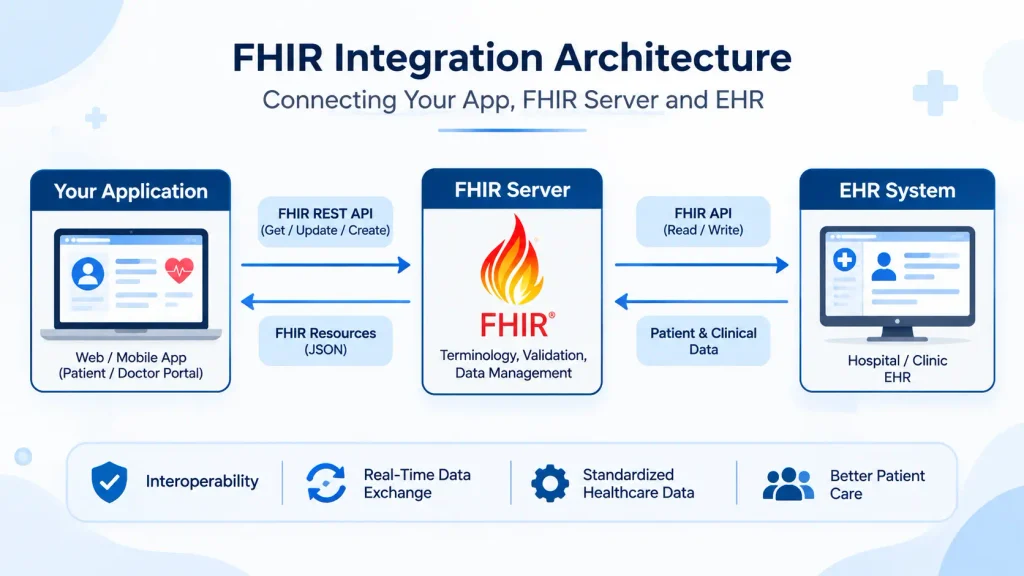
Most FHIR integration projects follow one of these patterns. Pick the simplest one that meets the use case.
| Pattern | How it works | Typical use |
| App launched inside the EHR (SMART EHR launch) | The clinician opens your app from the EHR, it receives the patient context and reads data | Clinical decision tools, AI documentation, specialty dashboards |
| Standalone patient or clinician app | The user logs in with the EHR or patient portal account, then your app reads their data | Patient apps, remote monitoring, second-opinion services |
| Backend system-to-system | Your server authenticates as a registered system, with no user present | Nightly sync, analytics, population health, payer data |
| Bulk data export | The $export operation returns large datasets as NDJSON files | Data warehouses, research, AI training on de-identified data |
| Write-back | Your app creates or updates resources in the EHR | Sending results, notes, questionnaires or appointments back |
| FHIR facade over legacy systems | A FHIR API is placed in front of HL7 v2 or a custom database | Modernizing older clinic or lab systems |
| National health network | Data shared in FHIR bundles through a national framework | India’s ABDM health information exchange |
One rule saves a lot of pain read before you write. Write-back usually needs extra EHR approval and testing, so many teams launch with read access first.
Step 1: Define the Use Case and Data
Good FHIR integration starts with a short, specific list:
- Who uses it: clinician, patient, or a backend system.
- Which resources: for example Patient, Encounter, Observation (labs and vitals), Condition, MedicationRequest, AllergyIntolerance.
- Read, write or both, and how often (on demand, every few minutes, nightly).
- Which systems: the EHRs, labs or networks you must connect to, and in which countries.
Every resource you add means more mapping, testing and approval, so keep the first release narrow.
Step 2: Read the CapabilityStatement and Implementation Guides
Every FHIR server publishes what it supports at its metadata endpoint:
curl -H “Accept: application/fhir+json” https://fhir.example.com/r4/metadata
The CapabilityStatement tells you the FHIR version, supported resources, search parameters, operations and security endpoints. Then read the implementation guides your partners follow. In the US, most EHR APIs build on the US Core Implementation Guide in India, ABDM uses FHIR R4 profiles published for its health information exchange. These guides decide which fields are required and which code systems to use.
Step 3: Start in a Sandbox
Never build FHIR integration against production first. Useful places to start:
- Public test servers such as the HAPI FHIR public server, for learning the API with test data only.
- SMART Health IT’s sandbox for testing SMART on FHIR launch flows.
- EHR developer programs from major vendors such as Epic and Oracle Health (Cerner), which provide documentation, test patients and app registration.
Never put real patient data on a public test server.
Step 4: Authenticate With SMART on FHIR
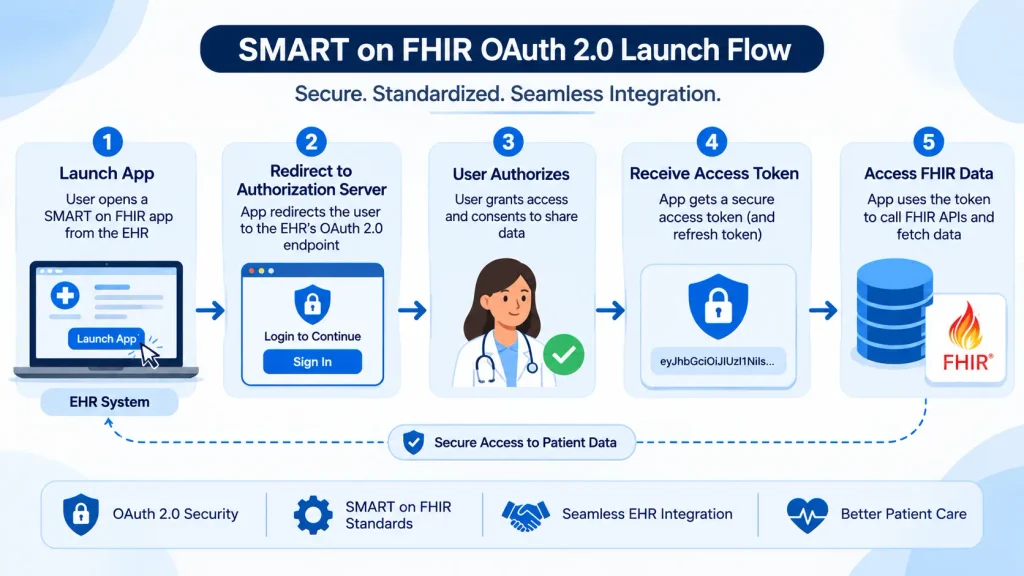
Most EHR FHIR APIs use SMART on FHIR for authorization. It builds on OAuth 2.0 and OpenID Connect, and comes in three common flows:
| Flow | When to use it | How it works |
| EHR launch | Your app opens inside the EHR | The EHR passes a launch token, your app exchanges it for an access token with patient and user context |
| Standalone launch | Users open your app directly | The user signs in through the EHR’s authorization server and picks or confirms the patient |
| Backend services | Server-to-server, no user | Your system signs a JWT with its private key and exchanges it for an access token (client credentials) |
Scopes define exactly what your app can access, for example patient/Observation.read (SMART v1 style) or patient/Observation.rs (SMART v2 style). Request only the scopes you need: EHR reviewers check this.
The general sequence for a user-facing app:
- Discover the authorization endpoints from [base]/.well-known/smart-configuration.
- Redirect the user to the authorize endpoint with your client ID, scopes, redirect URI and a PKCE code challenge.
- Exchange the returned code for an access token (and refresh token if allowed).
- Call the FHIR API with Authorization: Bearer <token> and the patient ID from the token response.
Use a maintained SMART client library rather than hand-rolling OAuth, and never store tokens in places like browser local storage or logs.
Step 5: Read and Write FHIR Resources
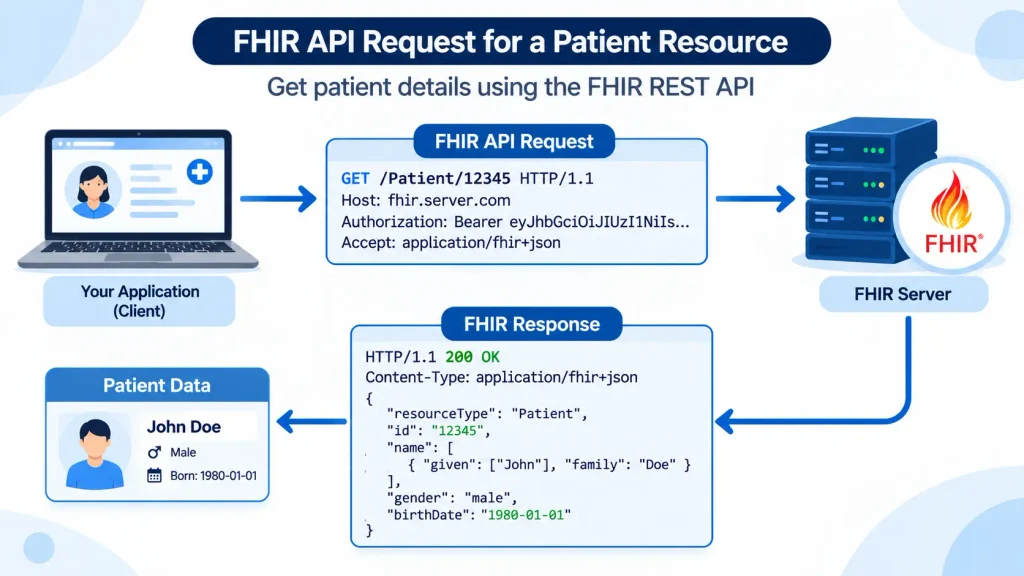
The FHIR API follows familiar REST patterns. Read a patient:
curl -H “Authorization: Bearer $TOKEN” \
-H “Accept: application/fhir+json” \
https://fhir.example.com/r4/Patient/123
Search for the patient’s recent lab results, newest first:
GET [base]/Observation?patient=123&category=laboratory&_sort=-date&_count=50
A simplified Observation for a blood glucose result looks like this:
{
“resourceType”: “Observation”,
“status”: “final”,
“category”: [{“coding”: [{“system”: “http://terminology.hl7.org/CodeSystem/observation-category”, “code”: “laboratory”}]}],
“code”: {“coding”: [{“system”: “http://loinc.org”, “code”: “2339-0”, “display”: “Glucose [Mass/volume] in Blood”}]},
“subject”: {“reference”: “Patient/123”},
“effectiveDateTime”: “2026-11-10T09:30:00+05:30”,
“valueQuantity”: {“value”: 98, “unit”: “mg/dL”, “system”: “http://unitsofmeasure.org”, “code”: “mg/dL”}
}
To write, POST the resource to [base]/Observation, or send a transaction Bundle when several resources must succeed or fail together. Use conditional create (If-None-Exist) or your own business identifiers to avoid duplicates when requests are retried.
Step 6: Map, Code and Validate Your Data
Most of the real work in FHIR integration is mapping:
- Map your data model to FHIR resources field by field, and document every decision.
- Use standard codes: LOINC for labs and vitals, SNOMED CT for clinical terms, and the medication and diagnosis code systems your market requires.
- Match patients carefully using identifiers (MRN, national IDs where allowed), never just names and dates of birth.
- Validate against the right profiles with the official FHIR validator or your server’s $validate operation before you send anything to a partner.
- Translate HL7 v2 where needed, using a tested mapping engine rather than custom string parsing.
Step 7: Handle Paging, Errors and Performance
Production FHIR integration has to cope with large results and imperfect servers:
- Follow paging links. Search results come back as a Bundle; keep requesting the link with relation: “next” until there is none.
- Read OperationOutcome errors. FHIR servers explain failures in this resource; log its details for support.
- Respect rate limits with backoff and retries, and make writes safe to retry.
- Cache reference data (practitioners, locations, code lookups), but always read clinical data fresh when it matters.
- Use bulk export for large datasets instead of thousands of individual searches.
- Monitor everything: response times, error rates and token failures per partner.
Step 8: Secure the Integration and Go Live
FHIR integration carries protected health information, so security is part of the build:
- TLS everywhere, short-lived tokens, least-privilege scopes and secure secret storage.
- Audit logs of every read and write, linked to the user or system that made it.
- No PHI in application logs, error trackers or analytics.
- Compliance for your market: HIPAA and business associate agreements in the US, GDPR in Europe, DPDP and ABDM in India. Our guide to HIPAA-compliant app development covers the US safeguards in detail.
Before production, most EHR vendors require app registration and review: your scopes, security approach, and a demonstration in their test environment. Plan several weeks for this, and complete testing with the clinic’s own test data before switching on real patients.
FHIR Tools and Libraries
| Need | Options |
| FHIR server | HAPI FHIR (open source, Java), cloud FHIR services from AWS, Azure and Google Cloud |
| Client libraries | HAPI FHIR client (Java), Firely SDK (.NET), fhir.resources (Python), SMART fhirclient (JavaScript) |
| Validation | Official HL7 FHIR validator, server $validate operation |
| Testing | Public test servers, SMART launcher sandbox, EHR vendor sandboxes |
| HL7 v2 to FHIR | Integration engines and mapping tools that convert v2 messages into FHIR resources |
Common FHIR Integration Mistakes
- Building to the base FHIR spec and ignoring the implementation guide your partner requires
- Requesting broad scopes “just in case”, which slows or fails EHR review
- Ignoring paging, so only the first page of results is ever processed
- Free-text values where standard codes (LOINC, SNOMED CT) are expected
- Matching patients on names and birth dates alone
- Writing PHI into logs and error messages
- Leaving app registration and vendor review until the end of the project
FHIR Integration Checklist
Use this checklist before any FHIR integration goes live.
- Use case, resources and read/write scope documented
- CapabilityStatement and implementation guides reviewed for each partner
- SMART on FHIR flow working with least-privilege scopes
- Field mappings and code systems documented and reviewed
- Resources validated against required profiles
- Paging, errors, retries and rate limits handled
- Duplicate-safe writes (conditional create or business identifiers)
- Audit logs in place; no PHI in application logs
- Compliance requirements and data agreements confirmed for each market
- EHR app registration and review completed
- Monitoring and alerting live for each connected system
Frequently Asked Questions
FHIR integration is connecting an app or system to other healthcare systems, such as EHRs, labs or national networks, using the HL7 FHIR standard to read and write health data through a RESTful API.
HL7 v2 is an older, message-based standard still common for lab results and admissions. FHIR is a modern, resource-based REST API using JSON, which is easier for web and mobile developers.
FHIR R4 is the best default for new FHIR integration work, because it is the most widely deployed version and the one most EHR APIs and implementation guides use.
SMART on FHIR is an authorization framework built on OAuth 2.0 and OpenID Connect that lets apps securely access FHIR data, either launched inside an EHR, standalone, or as a backend service.
Yes. Both offer FHIR APIs and developer programs with sandboxes. Production access usually requires app registration, review and approval from the vendor and the health system.
A focused read only FHIR integration with one EHR typically takes 6-12 weeks, including sandbox work, mapping, security and vendor review. Write-back and multiple EHRs take longer.
FHIR is a data standard, not a compliance program. Your integration is HIPAA compliant only if you add the required safeguards, such as encryption, access control, audit logs and business associate agreements.
Yes. ABDM uses FHIR R4-based profiles for sharing health records through its consent-based health information exchange.
Briskcovey is an AI-first software studio and Anthropic Claude Partner that builds and runs RazorClinic, its own clinic management SaaS. We build FHIR integrations, SMART on FHIR apps and healthcare platforms for clients in the US, UK, UAE, Australia and India.
Work With Briskcovey
Briskcovey is an AI-first software studio in Jaipur, India, and an Anthropic Claude Partner. We deliver end-to-end FHIR integration, SMART on FHIR apps, EHR integrations, FHIR servers and facades, HL7 v2 to FHIR mapping and ABDM integration, as part of secure healthcare platforms like our own clinic management software, RazorClinic. For the bigger picture, read our HealthTech App Development in 2026 playbook.
Book a free 30-minute FHIR integration consultation