A clinic owner once asked us a simple question. “Can ChatGPT answer my staff’s questions about our own policies?” We tried it in front of him. It answered confidently, sounded professional, and got the clinic’s cancellation policy completely wrong. It had never seen the policy. It just guessed.
That moment explains why RAG development has become one of the most requested AI projects we work on. Businesses don’t want an AI that knows everything about the world. They want one that knows their world, their documents, their prices, their procedures, and can prove where every answer came from.
In this guide we’ll walk through RAG development the way we explain it to clients. No hype, no jargon walls. Just how it works, where it pays off, how to build it properly, and the mistakes that quietly ruin most projects. It’s the same approach we use in our AI automation services at Briskcovey.
Key Takeaways
- RAG lets an AI model look things up in your own documents before it answers, so replies are based on your facts, not guesses.
- It’s usually faster, cheaper and easier to keep current than fine-tuning a model.
- Most of the work in RAG development isn’t the AI. It’s cleaning documents, splitting them sensibly and testing answers.
- Good systems show their sources and say “I don’t know” when the answer isn’t in your data.
- A focused RAG assistant typically takes 4 to 8 weeks to build and test properly.
What RAG Actually Is
RAG stands for retrieval-augmented generation. The name sounds heavy, but the idea is simple.
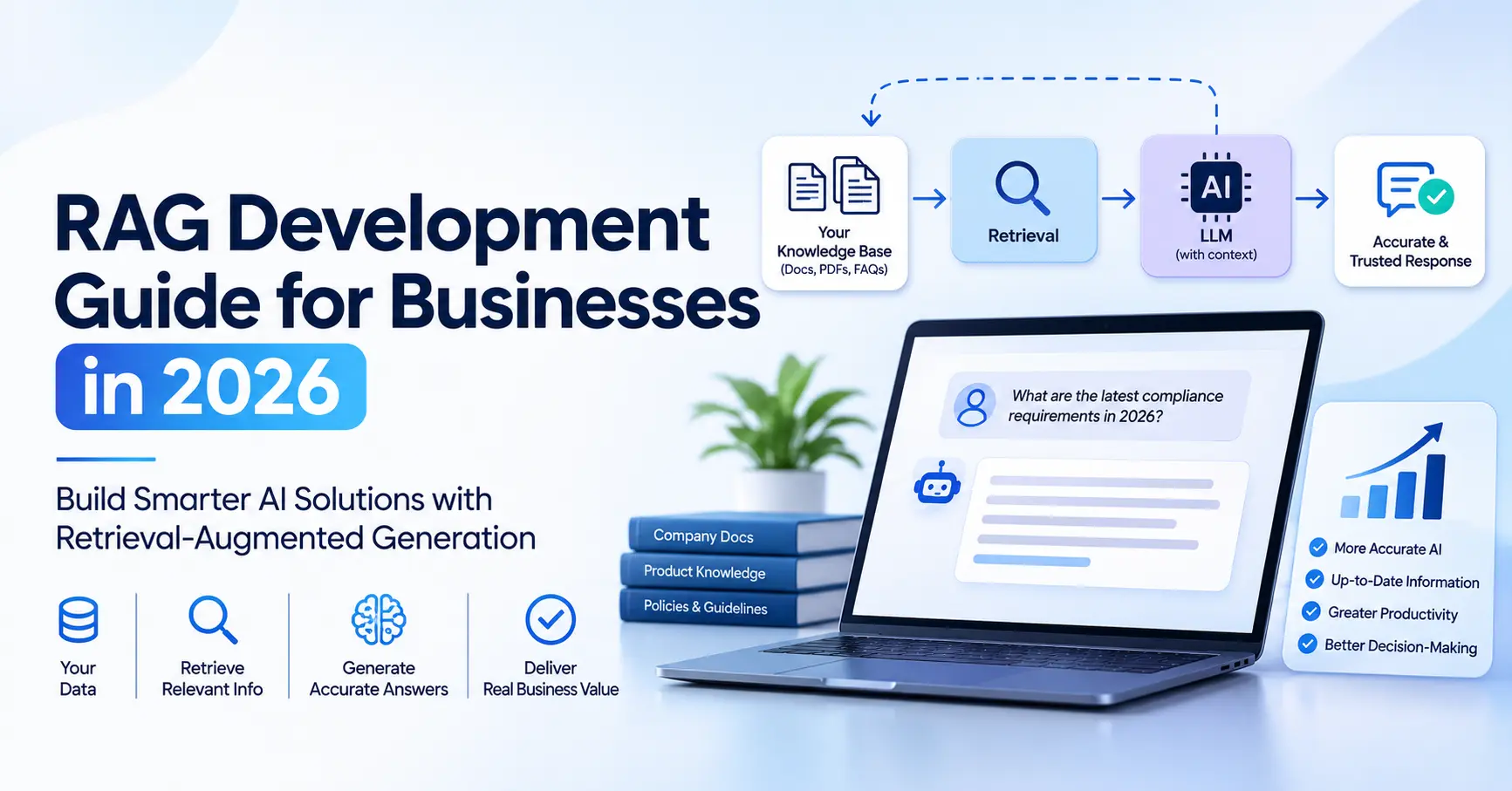
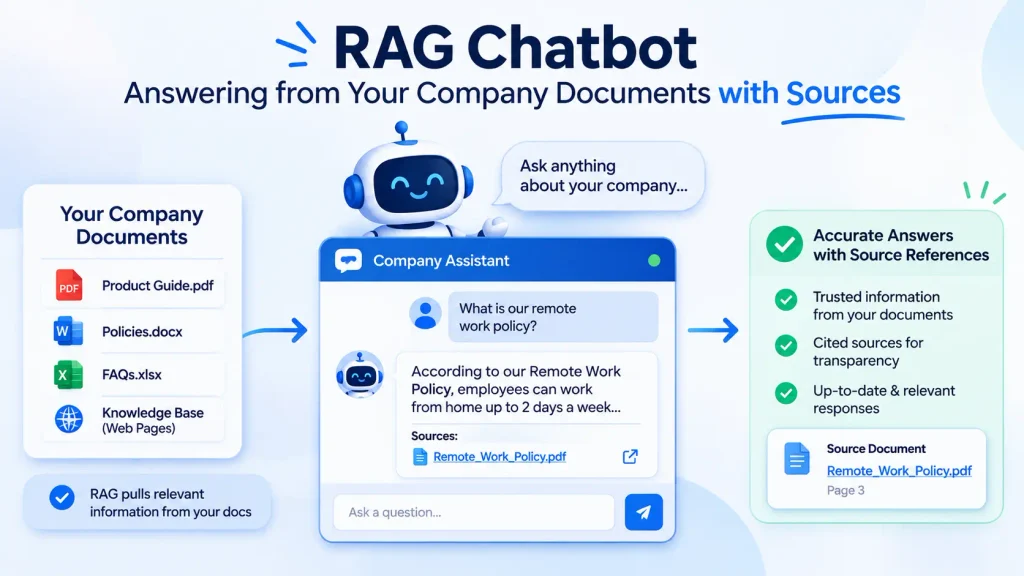
Think of a new employee on their first day. They’re smart and they write well; they just don’t know your company yet. You wouldn’t let them answer a customer from memory. You’d hand them the right policy document and say “check this first.” RAG does exactly that for an AI model. When someone asks a question, the system first searches your documents, pulls out the few passages that matter, and gives them to the model along with the question. The model then writes an answer based on those passages, and ideally tells you which ones it used.
So RAG development is really the work of building that “check this first” step well. Finding the right passages, every time, quickly and securely, is where the skill lies.
RAG vs Fine-Tuning: Which One Do You Need?
This is the question we get most often, and the honest answer is that most businesses need RAG, not fine-tuning, at least to begin with.
| RAG | Fine-tuning | |
| What it changes | What the model can look up | How the model behaves or writes |
| Keeping it current | Update the documents and you’re done | Retrain whenever facts change |
| Showing sources | Easy, answers can cite documents | Hard, knowledge is baked in |
| Time to first version | Weeks | Often longer, with data preparation |
| Best for | Answering from policies, manuals, contracts, product data | A very specific tone, format or narrow task |
In practice the two can work together. But if your goal is “answer accurately from our documents,” RAG development is almost always the right place to start.
Where RAG Development Pays Off
RAG shines wherever people waste time hunting for answers that already exist somewhere in your files. A few examples from the kinds of projects we see.
Customer support: Your help articles, product manuals and past tickets already hold most answers. A RAG assistant can reply in seconds, link the exact article, and pass anything tricky to a human.
Internal knowledge: HR policies, SOPs, onboarding guides, IT instructions. New staff stop interrupting senior colleagues with the same ten questions.
Healthcare: Clinic protocols, insurance rules and drug guidelines, available to staff in plain language. Patient data needs extra care here, which we cover in our guide to HIPAA-compliant app development.
Real estate: Brokers ask about payment plans, service charges and project details across dozens of developer brochures. RAG pulls the right figure from the right brochure, instead of an agent scrolling through PDFs on a call.
Legal and finance: Contracts, compliance documents and reports are long and full of exceptions. RAG helps teams find the clause that matters, with a citation they can check.
The pattern is always the same. If the knowledge exists in writing and people keep asking about it, RAG development is worth a serious look.
How a RAG System Works
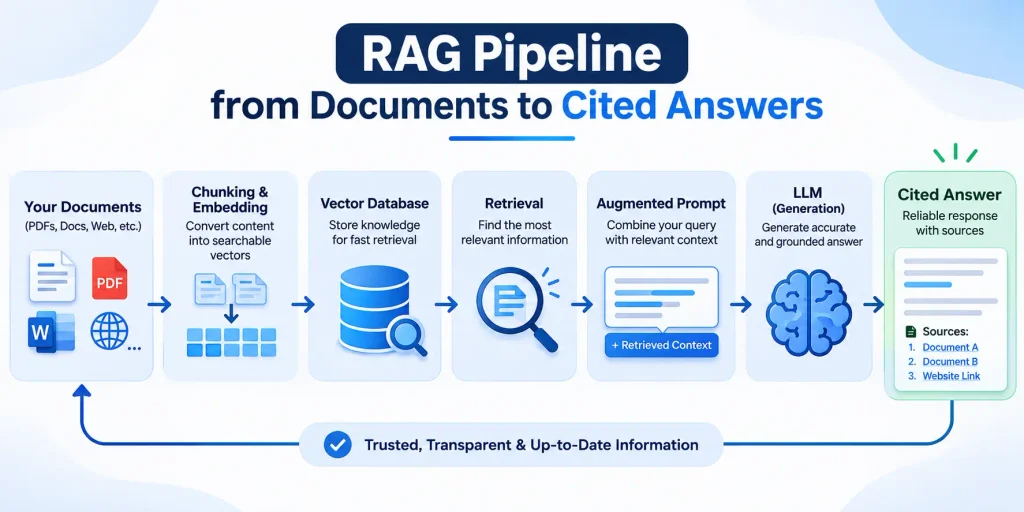
Every RAG system has two halves. One runs in the background to prepare your knowledge. The other runs each time someone asks a question.
Getting the knowledge ready happens once, then again whenever documents change.
- Documents are collected from wherever they live, such as Google Drive, SharePoint, Notion, a website or a database.
- They’re cleaned up and split into smaller passages, often called chunks.
- Each chunk is turned into an embedding, a list of numbers that captures its meaning.
- The chunks and their embeddings are stored in a search index, usually a vector database.
Answering a question happens in a second or two.
- The user’s question is turned into an embedding the same way.
- The system finds the chunks closest in meaning, often combined with normal keyword search.
- The best few chunks are re-ranked and handed to the language model with the question.
- The model writes an answer using only those chunks and points to its sources.
That’s the whole idea. The quality of a RAG system depends almost entirely on how well each of those steps is done, which brings us to the build.
How to Build a RAG System: Step by Step
Step 1: Give the Assistant One Clear Job
The projects that struggle usually start with “put all our documents in and let people ask anything.” The ones that succeed start narrow. “Answer front-desk questions about appointments, fees and insurance” is a job. “Know everything about the company” is not. We write down 30 to 50 real questions people ask today, with the correct answers. That list becomes the test set later.
Step 2: Clean the Documents Before Anything Else
This is the unglamorous part, and it decides most of the outcome. Old versions get removed so the AI doesn’t quote last year’s prices. Scanned PDFs get proper text extraction. Tables are kept as tables instead of being flattened into nonsense. Headers, footers and page numbers that repeat on every page get stripped out. If two documents disagree, someone at the business decides which one is right.
Step 3: Split Documents the Way a Human Would Read Them
Chunking sounds technical, but the principle is common sense. Split by sections and headings, not by a fixed number of characters that cuts a sentence in half. Keep each chunk small enough to be specific and large enough to make sense on its own. We also attach context to each chunk, such as the document title, section name and date, so a passage about “the 30-day policy” still makes sense when it’s read alone. Anthropic’s write-up on contextual retrieval shows how much this one step can improve results.
Step 4: Search Two Ways, Then Re-Rank
Meaning-based search (embeddings) is great at understanding that “refund” and “money back” are related. Keyword search is better at exact things like product codes, policy numbers or a person’s name. Good RAG development uses both, merges the results, and then re-ranks the top candidates so only the most relevant few reach the model.
Step 5: Tell the Model Exactly How to Behave
The instructions matter. Ours usually say to answer only from the passages provided, to cite the source for each claim, to ask a follow-up question if the request is unclear, and to say plainly when the answer isn’t in the documents. That last rule is the difference between a tool people trust and one they stop using after a week.
Step 6: Show the Sources in the Interface
Every answer should link to the document and section it came from. Users check the first few answers, see they’re right, and start trusting the system. If an answer is wrong, the source link shows exactly which document needs fixing.
Testing Answers Before Anyone Else Does
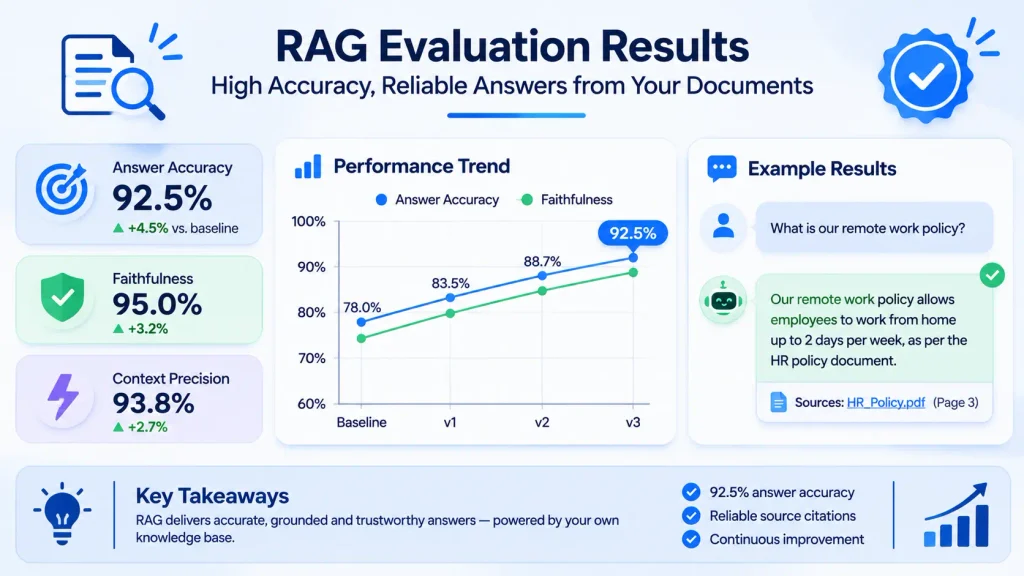
Here’s something most vendors won’t tell you. A RAG demo that looks great on five questions can fall apart on the fiftieth. That’s why testing is a real phase of RAG development, not a quick click-through before launch.
Remember the 30 to 50 questions from Step 1? We run every one of them through the system and check three things.
- Did it find the right passages? If the correct document wasn’t retrieved, the model never had a chance.
- Is the answer correct and complete? Does it match what the business says is true?
- Did it stay grounded? Every claim should come from the sources, with nothing invented.
We also throw in questions the system shouldn’t be able to answer, to make sure it says “I don’t have that information” instead of making something up.
After launch, testing doesn’t stop. We review real conversations every week at first, add tricky new questions to the test set, and re-run it whenever documents, prompts or models change. A thumbs-up and thumbs-down button on each answer is one of the cheapest and most useful features you can add.
Security, Permissions, Cost and Speed
Permissions (the part people forget): If the HR folder holds salary data, the support assistant must never be able to retrieve it. In serious RAG development, every chunk keeps the access rules of its original document, and search only returns what the person asking is allowed to see. Filtering after the answer is written is too late.
Documents are data, not instructions: A web page or uploaded file can contain hidden text trying to steer the AI. This is called prompt injection, and it’s one of the risks listed in the OWASP Top 10 for LLM Applications. The model should never follow instructions found inside retrieved content.
Sensitive data: Use AI providers with proper data agreements, keep personal information out of the index unless it’s truly needed, and log who asked what. For US healthcare data, that includes a business associate agreement with every vendor that touches patient information.
Cost and speed are design choices: Sending fewer, better chunks to the model makes answers both faster and cheaper. Caching common questions helps too. Most well-built RAG assistants answer in a few seconds, and the running cost per question is usually small compared with the staff time it saves.
The Tech Stack and Realistic Timelines
There’s no single “right” stack, and tools change fast. This is a sensible default we often start from.
| Layer | Common choices |
| Language model | Claude or another capable LLM, chosen per task |
| Embeddings | A strong embedding model suited to your languages |
| Vector search | pgvector in PostgreSQL, or a managed vector database |
| Keyword search | PostgreSQL full-text search, Elasticsearch or OpenSearch |
| Re-ranking | A re-ranking model to pick the best few passages |
| Orchestration | Plain Python, or a framework such as LangChain or LlamaIndex |
| Connectors | Google Drive, SharePoint, Notion, websites, databases, or MCP servers |
| Interface | A web chat, Slack or Teams, WhatsApp, or inside your own app |
As an Anthropic Claude Partner, we often build on Claude because it follows instructions closely and handles long documents well, but we pick the model that fits each project. If you’re curious what that partnership means for clients, we’ve written about working with a Claude partner.
As for timing, here’s what RAG development usually looks like in practice.
| Project | Typical timeline |
| Pilot on one document set, tested with a small team | 2 to 4 weeks |
| Production assistant with permissions, sources and monitoring | 4 to 8 weeks |
| Company-wide knowledge platform across several systems | 2 to 4 months |
The biggest variable is never the AI. It’s how messy the documents are and how quickly someone can confirm the right answers.
Mistakes We See Again and Again
After enough RAG projects, the same problems keep showing up. Most of them are avoidable.
Dumping every document in at once: More data doesn’t mean better answers. Outdated files, duplicates and drafts confuse retrieval and lead to confident wrong answers.
Chunking by character count: Cutting a policy in the middle of a sentence means the model only ever sees half the rule.
Relying on meaning-based search alone: It struggles with exact codes, names and numbers, which are often exactly what users ask about.
No “I don’t know” rule: If the model is allowed to fill gaps from its general knowledge, it eventually will, and that’s when trust breaks.
Skipping permissions: One leaked salary figure or private contract can end a project overnight.
Treating launch as the finish line: Documents change every month. Without someone owning updates and reviewing answers, quality slowly drifts.
If you’re planning something bigger than question-answering, such as an assistant that also takes actions in your systems, our guide to AI agent development covers the extra safeguards you’ll need.
Frequently Asked Questions
RAG development is building an AI system that searches your own documents and data first, then uses what it finds to answer questions. It’s how you get an AI assistant that answers from your facts instead of guessing.
For answering questions from company knowledge, usually yes. RAG is faster to build, easy to update when documents change, and can show its sources. Fine-tuning is better for teaching a model a specific style or narrow task.
It can, especially when documents are outdated, badly split or contradictory. Good RAG development reduces this with clean data, strong retrieval, clear instructions, source citations and regular testing.
Almost anything written: PDFs, Word files, web pages, help articles, spreadsheets, support tickets and database records. Scanned documents need proper text extraction first.
A pilot usually takes 2 to 4 weeks. A production assistant with permissions, source links and monitoring typically takes 4 to 8 weeks, and a company-wide platform takes 2 to 4 months.
Yes, when it’s built with access controls on every document, proper data agreements with the AI provider, protection against prompt injection and full logging.
Most RAG systems use one, but it doesn’t have to be a separate product. Many teams start with pgvector inside PostgreSQL, which keeps things simple.
BriskCovey is an AI-first software studio and Anthropic Claude Partner. We build RAG assistants and AI agents for healthcare, real estate, travel and business operations, with testing, security and source citations built in from day one.
Working With Briskcovey
We’re BriskCovey, an AI-first software studio in Jaipur, India, and an Anthropic Claude Partner. RAG development is a big part of what we do: assistants that answer from your policies, manuals, contracts and product data, connected to the tools your team already uses, with permissions and source links built in.
If you have a pile of documents and a team that keeps asking the same questions, let’s talk. Bring us 20 of those questions, and we’ll show you what a well-built RAG assistant does with them.
Book a free 30-minute RAG consultation